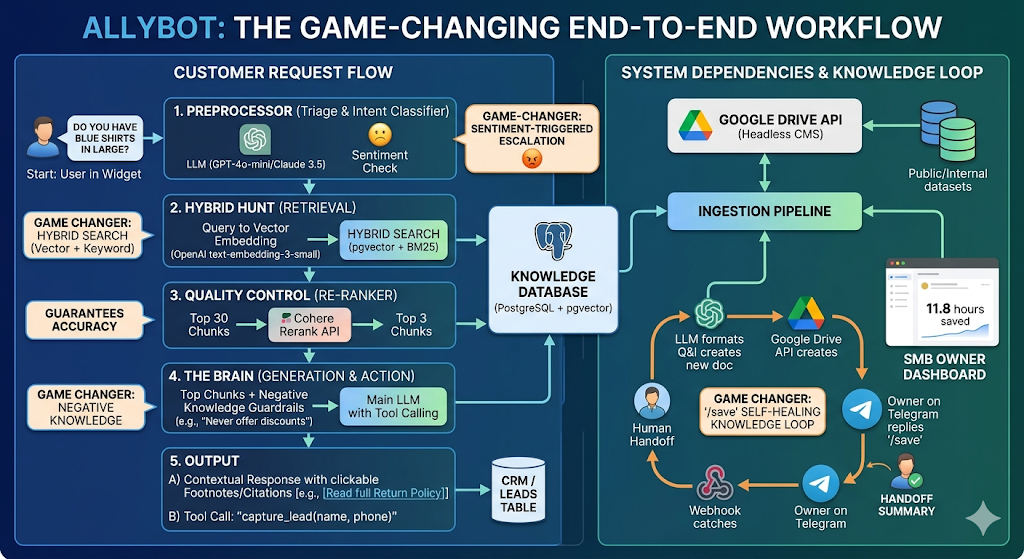
Allybot - The Secret Sauce for Good Answers
The three AI models used:
- GPT-4o-mini — the fast model for quick analytical tasks
- GPT-5.4-mini — the main powerhouse model for search and response generation
- text-embedding-3-small — OpenAI's embedding model for converting text into mathematical vectors
Step 1: Sentiment Triage (GPT-4o-mini)
The visitor's message is immediately analysed for emotional tone — is the person happy, neutral, frustrated, or angry? It also checks for profanity and ALL CAPS. If the visitor is furious (angry + profanity/ALL CAPS) and Smart Escalation is on, AllyBot stops everything and hands off to a human agent immediately. It also detects the visitor's intent — is this an informational question, a complaint, a purchase inquiry, or just casual conversation?
Step 2: Conversational Fast-Path
If the message is purely conversational (like "thanks", "ok cool", "hi there"), AllyBot skips the entire search pipeline and responds directly. This keeps casual exchanges fast and cheap. If the visitor says something conversational like "yeah, tell me more" after a substantive exchange, AllyBot recognises there's recent informational context and overrides the conversational classification to go through the full pipeline instead. This prevents it from losing context mid-conversation.
Step 3: Query Rewriting (GPT-4o-mini)
If a visitor says "what about the blue one?" three messages into a conversation, AllyBot rewrites the query using conversation context — turning it into something like "What are the features of the blue Widget Pro model?" This means every search is contextually aware.
Step 4: Hybrid Knowledge Base Search (text-embedding-3-small + PostgreSQL)
AllyBot runs two searches simultaneously and combines the results:
- Vector/Semantic Search — Converts the query into a mathematical vector (embedding) and finds KB article chunks that are semantically similar. This catches meaning — so "affordable pet food" would match an article about "budget-friendly dog meals".
- BM25/Keyword Search — A traditional full-text search that looks for matching words and phrases. This catches exact terms — like specific product names, model numbers, or technical terms that semantic search might miss.
Both searches run in parallel for speed, then the results are combined using a technique called Reciprocal Rank Fusion (RRF). This merges the two ranked lists into a single list that benefits from both approaches.
Step 5: AI Re-ranking (GPT-4o-mini)
The hybrid search results are passed through an AI re-ranker that scores each chunk's actual relevance to the specific question on a 0-1 scale. Chunks below the 30% confidence threshold are discarded entirely, preventing irrelevant search results from polluting the AI's response.
Step 6: KB Insight Extraction (GPT-4o-mini)
If good KB matches are found, AllyBot extracts 2-3 key product attributes (e.g., "grain-free formula," "suitable for large breeds"). It uses these insights to create an "enriched query" that combines the visitor's question with the attributes.
Step 7: Website Search (GPT-5.4-mini with web search)
If a website URL is configured, AllyBot searches the actual website for relevant product or information pages. It uses the enriched query and specifically looks for pages on your domain with pricing information, filtering out results from other domains.
Step 8: Web Search Fallback (GPT-5.4-mini with web search)
If both the KB and website search lack enough information (fewer than 2 good KB chunks and no website results), AllyBot searches the broader internet for supplementary information.
Step 9: Escalation Check
If all searches come up empty (all KB chunks below threshold, no website, and no web results) and Smart Escalation is on, AllyBot hands off to a human rather than making something up.
Step 10: Response Generation (GPT-5.4-mini)
GPT-5.4-mini generates the final response, assembling all the gathered intelligence. The prompt includes:
- Your chosen personality style (professional, friendly, etc.)
- The top-ranked KB article chunks with source attribution
- Website search results with product links
- Any supplementary web search results
- The last 8 messages of conversation history
- Visitor info (name, email)
- Lead capture instructions (if enabled)
The model is instructed to synthesise KB insights with website products (e.g., explaining why a product is a good fit from the KB and linking to where to buy it from the website).
Why this is better than a "normal" chatbot:
While a typical chatbot does: receive message → keyword search → paste results into prompt → generate response, AllyBot uses a more comprehensive process: sentiment analysis → conversational detection → query rewriting → dual parallel search (semantic + keyword) → rank fusion → AI re-ranking → insight extraction → enriched website search → web fallback → contextual response generation.
The key advantages are:
- It understands meaning, not just keywords (semantic search)
- It understands context — "the blue one" becomes a proper search query (query rewriting)
- It filters out noise — irrelevant search results are removed before they can confuse the response (AI re-ranking)
- It connects your KB to your website — KB insights power smarter website searches (insight extraction + enriched queries)
- It knows when to stop — rather than hallucinating when it doesn't know, it escalates to a human (confidence thresholds)
- It's fast for simple messages — casual exchanges skip the entire pipeline (conversational fast-path)